
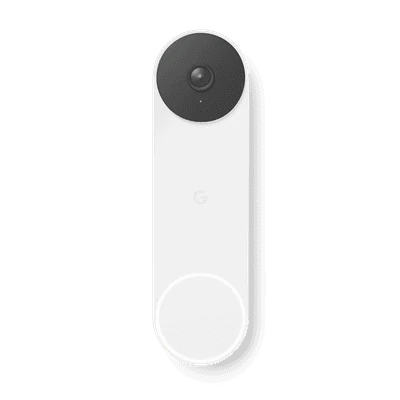
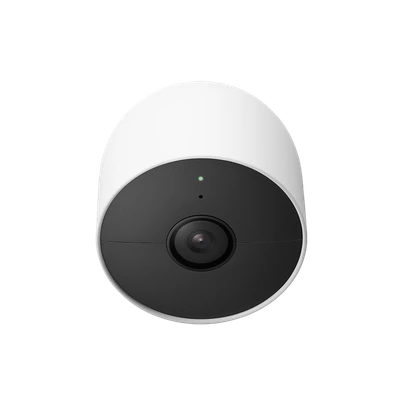
For a Katy or Houston homeowner, the first decision is about the view you need. If visitors and deliveries at your front entrance are your priority, begin the conversation with a doorbell. If you want to review a driveway, side approach or backyard access point, discuss an outdoor camera location.
This guide compares the battery models pictured. Other Nest generations have different specifications. Images illustrate options; your written quote identifies the devices in your package.
Choose the location before the device.
A doorbell puts a camera at the entrance where someone would press the doorbell button. A separate camera lets you discuss a different mounting location and view. One may not replace the other: a front-door angle is not automatically the angle you want for a side gate or driveway.
Describe what you need to see and ask your representative to review the proposed placement. Consider privacy around neighboring homes and the ability to reach the device for maintenance. Avoid choosing a location solely because a device fits there.
| Question | Nest Doorbell (battery) | Nest Cam (battery) |
|---|---|---|
| Where would you discuss placing it? | At the entrance used by visitors and deliveries. | At a suitable indoor or outdoor position for the area you want to view. |
| How is this model powered? | Rechargeable battery; compatible doorbell wiring can provide charging. | Rechargeable battery or a compatible continuous-power accessory. |
| What needs a site-specific review? | Doorbell wiring, chime compatibility, mounting and the entrance view. | Mounting, power-accessory suitability, Wi-Fi and the camera view. |
Discuss power and connection requirements.
The battery-model names do not mean that every installation is identical. Google documents battery and compatible-wiring options for its battery doorbell, and battery or suitable power-accessory options for Nest Cam (battery). Ask how the proposed setup will be powered and maintained at your home.
Have the installer confirm your doorbell system before connecting to existing wiring. For an outdoor camera, discuss the appropriate mount and any required outdoor-rated power accessory. Your presentation should identify any work or accessories outside the quoted installation scope.
Confirm the app, recording and security-system fit.
Ask which app you will use, which alerts and recording features are included, and whether a subscription is needed for the features you want. Ask how long recorded events are available and who will have access to the account. Answers depend on the exact model and service selected.
If you are also considering an ADT system or touchscreen, confirm compatibility for that particular setup. Do not assume that every Nest model appears on every ADT panel or works with every package. Keep the written equipment list so you can compare it with the product examples shown online.
Bring one or two priorities to the presentation.
You do not have to decide on a full camera layout before requesting help. Start with your most important view and one additional area you would like to discuss. Your representative can review the options, installation requirements and complete package with you.
Use the home security quote checklist to prepare your questions, or request a presentation to explore the equipment offer. No purchase is made by requesting a conversation.
Official device references
Check the current specifications for the exact model in your quote.